Showing posts with label quicksilver. Show all posts

May 08, 2011

Applescript to remove and add login items

The login items for your user account in system preference is where you set applications to launch anytime you login to your computer, including restarts. My recent switch back to Quicksilver prompted the compilation of this script, which shows code that will remove other launchers from startup status and ensure that QS is set.

-- Script to remove other launchers from login items and add Quicksilver

tell application "Finder" to set QSpath to POSIX path of (application file id "com.blacktree.Quicksilver" as string)

tell application "System Events"
if login item "LaunchBar" exists then delete login item "LaunchBar"
if login item "Alfred" exists then delete login item "Alfred"
if (login item "Quicksilver" exists) is false then make new login item at end of login items with properties {path:QSpath, hidden:true, kind:application, name:"Quicksilver"}
end tell

May 04, 2011

I Do Love Me Some Quicksilver

One of the most exciting things to happen to the Mac in quite some time is that a fresh team of developers has taken on the mantle of rejuvenating Quicksilver, the outstanding launcher and quick operation task master for Mac. You can find several references to Quicksilver on the MacBiblioblog and the Accordance actions were originally written for QS.
QS went abandoned for quite some time, and I spent some weeks trying out LaunchBar and the newer, underpowered AlfredApp. I sorta settle on LB, but the result was that I spent as much time clicking in the Spotlight window as I did invoking LB. Well this has changed with the release of the new stable version of QS. Updates are coming regular. Quicksilver has a new home at QSApp.com and they maintain a blog that keeps up a fantastic pace of tips and tutorial at LoveQuicksilver. If I sound giddy, it's because I am.

September 21, 2010

Services and scripts for Accordance 9

Updated: As far as I know, most Accordance scripts and Services are now working again as of Accordance 9.02. Please let me know if this is not the case.

Previous: Changes in the new version of Accodance have broken some of my scripts. This is common for each major release. Notice their widget is also disabled. I'm getting lots of contacts… I am aware things are broken. I can not work on a new compatible version of my script library until after a new Accordance hits the public, so sometimes it has been a matter of weeks. In this instance, you can know I will begin a new version of the Accordance Script Library once Accordance has released a version that works with their widget once again.

October 08, 2009

Back to Quicksilver on Snow Leopard

Quicksilver, the amazing tool that it is, continues to live on life support. A small open source community seem to be giving it attention. I spent an intentional month with LaunchBar and then with Google Quick Search Box each to try and migrate to either of those. It just didn't work out. LB was certainly stable, but still underpowered. Some things in QS that I just depend on can't be done in LB (global triggers one of them). So, then on to Google's attempt, which is developed by QS' creator. It is definitely the underdog in this category... searches didn't even find the files I wanted. You have to use xcode to write plugins for now. I really look forward to trying out gQSB2.0 when it arrives. I expect huge improvements.

So, for now, I'm back with Quicksilver, though I've begun to play with creating Services for some of my own plugins that can now receive global key combinations in Snow Leopard. I have all my Accordance actions running native on Snow Leopard now as Services that don't require Quicksilver, Launchbar or anything. I hope to find the time to make them available soon.

And speaking of Snow Leopard...

On The Apple Blog a month ago, there was a helpful article pointing out that some QS plugins are causing crashes in Snow Leopard.

From what I’ve been reading on support forums, some users of Quicksilver saw no affect from upgrading their machines to Snow Leopard. I however, was not one of those people. And although I am warming more and more to Google Quick Search Box, I still supplement my usage of QSB with Quicksilver where the former is lacking in features. So I tinkered around until I was able to resuscitate and use Quicksilver again under Snow Leopard.
Really, the thing to do is install the latest Open Source build

and then navigate to:
~/Library/Application Support/Quicksilver/PlugIns
and remove all teh plugins and restart QS. If things run well, then you can selectively try plugins to add back in. Definitely stay away from UI plugins and AirPort Module.qsplugin and Services Menu Module.qsplugin.

August 27, 2008

Introducing Ubiquity: Quicksilver for Firefox?

This inter(web)application utility now in beta called Ubiquity is a fascinating project. It's very similary to Quicksilver, in some respects, but it is a plug-in designed to work on Firefox (Mozilla browsers).

As it develops, it may present real possibilities for online research.

July 08, 2008

Quicksilver's Back

News from 43 Folders on Quicksilver development:

"Since going open source late last year, things have seemed pretty quiet in the world of our favorite app launcher, Quicksilver. Today, our pal, Tim Gaden of Hawk Wings, posts on the availability of a bug fix release of Quicksilver that’s come out in the last few weeks. He also points to a thread on the QS Google Group that suggests Quicksilver’s auteur and flippered mystery bot, A1c0r, is currently hard at work on a substantial rewrite: "Please note that this is only a bug fix version, the creator of Quicksilver (Alcor) is working on a complete re-write of the frameworks of Quicksilver and should hopefully release it soon ;)"
And there was much rejoicing.

May 26, 2007

Access Any Menu Item in Your Application with a Keystroke Using Quicksilver Proxy Objects

Being attentive to how you work, when you're doing the Lord's work, is just plain good stewardship.

I have become a big fan of Quicksilver, the Mac utility that puts an endless amount of productivity at your fingertips. Here's a great tip for accessing menu items in an application: Comprehensive and feature-complete applications have lots of menu item options--too many to remember the assigned keyboard shortcuts for those that even have one. Enter Quicksilver. Here's how to gain access to every menu item with a simple keystroke. For adding some great features to Quicksilver, you must enable "Proxy Objects" in the Quicksilver section of the Catalog. Invoke Quicksilver and press Command semi-colon (⌘;) to bring up the Catalog preference pane. Check "Proxy Objects". When you've done this, Quicksilver now has access to the "Current Application" item. Now you can invoke Quicksilver, start typing "Current Appl..." and it will find this action... then tab to the next pane and start typing "Show Menu Items". (Make sure you have that action and not the "Show menu" action.) When you invoke, you'll get a new Quicksilver window with an exhaustive list of every menu items in your current application. A couple keystrokes later and you have your menu item. The real bonus of this method is you don't memorize keyboard shortcuts. If I want to set the text to blue, I just type "bl..." and hit return. One obscure keyboard combination is not quicker than a few keystrokes, because typing familiar words takes less time. The final step to putting all of this into muscle memory is to assign a keystroke to the "Show Menu Items" action. Simply invoke Quicksilver again, get to "Current Application", tab and then "Show Menu Items", but instead of hitting return, press Command apostrophe (⌘') to bring up the Trigger pane of Quicksilver preferences. Press the little "+" sign at the bottom of the window and add a new hotkey. You can see mine is set to Control-Option-M (⌃⌥M) as in menu). I now have instant access to any menu item in any app.

So, let's say I have some text selected in Accordance, and I want to change it to Yellow. I just invoke with my "Show menu items" trigger, and type "Yel.." and return. If this is a menu item that I use alot and it doesn't have a built-in keyboard shortcut, I can make a trigger to that item. Just invoke the menu items, and select "Yellow", hit tab instead of return and then Command apostrophe to bring up the Trigger panel to make a new trigger again.

If there's anything you can't make easy with Quicksilver, this incredible free utility, I don't know what it is. You can also find a video cast on using this feature from productivity geek/guru Merlin Mann. Have fun being productive.

February 24, 2007

Juggling Keyboard/Spotlight/Quicksilver ⌃⌥⌘ ␣ key combos

Historically, the key combo shortcut for invoking Spotlight, invoking Quicksilver, and toggling the international Unicode input keyboards are all the same, namely, Command Space (⌘ ␣). To include all three features in my workflow, here's what I've done:

Quicksilver has long used the Control key (⌃) as another standard option, and it also has a double-tap option for invoking. And then, moving the international keyboard input to utilize the Option key (⌥) everything gets cleared up. So, all I need remember is Command key for Spotlight to search the contents of files on my drive, Option key for for toggling back and forth with Greek input, and Control key for Quicksilver and all its magic. It quickly becomes muscle-memory if you use them as frequently as I do.

Here's the full summary:

⌘ ␣

Spotlight invoke

⌥⌘ ␣

Spotlight window invoke

⌥ ␣

Toggle two most recent input keyboard

⌃⌥ ␣

Cycle among input keyboards

⌃ ␣

Quicksilver invoke

⌃⌃

Quicksilver double-tap invoke

(Truth be told, I've set the primary invoke for Quicksilver to ⌃⌘ ␣ but still always use the ⌃⌃ double-tap to invoke. This is because I've kept Word's default ⌃ ␣ as "remove character formatting", which I use a ton.)

Update: In Snow Leopard, you can ignore the "Select next keyboard" command that cycles through them, since now you can hold down the "Select Previous" key combination and get a nice HUD to move around.

October 03, 2006

Quicksilver Actions for Accordance

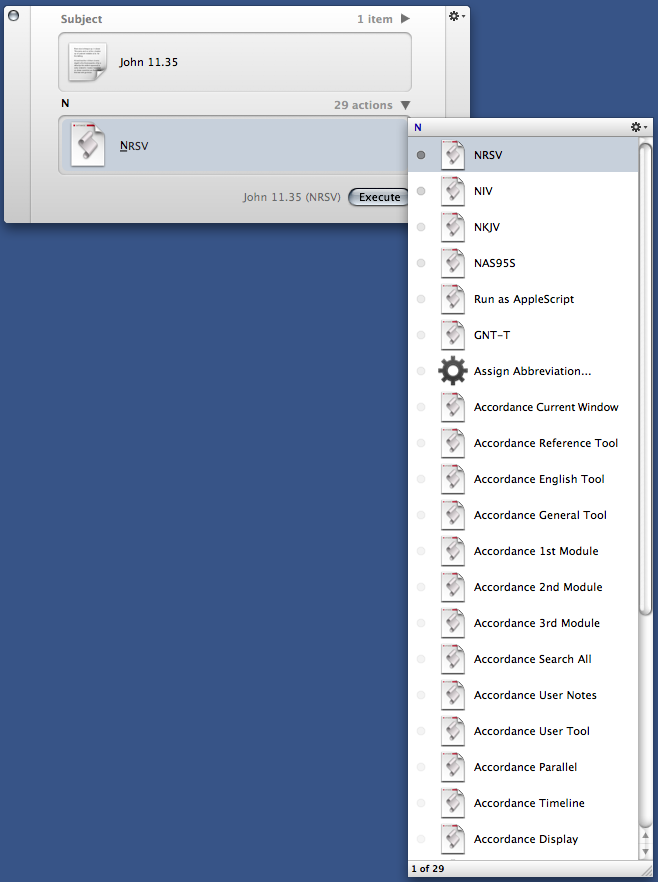
After some work, and feedback from others, I can make available to a wider audience a set of Quicksilver Actions that interact with Accordance. I have maintained from time to time a script database called InterCord which uses Mac OS X technologies to enhance the inter-application experience with Accordance. Problem is, I rarely find the time to polish the scripts and such enough so that they'll work on other's machines.
Well, if you are a user of Quicksilver and Accordance, you'll love these. If you don't yet use Quicksilver, this may convince you. Essentially, this bundle of Quicksilver Actions enables you to do things like pull the selected scripture reference from a document and have QS paste the text into your front document, or otherwise process it. The actions also allow you to use any text and display a search for it in any Accordance tool of your liking.
What's that? You're reading a PDF or a web page about the proximity of Shechem to a mountain pass? Just highlight shechem and in 5 or so keystrokes you can have Accordance to the front, displaying Shechem in a Map window. I'm not kidding you.

Or, want to quickly, insert the text of Psalm 20 into your current document. It's a all right at your fingertips, and true to the beauty of Quicksilver, never taking your fingers off the keyboard. Such a workflow becomes pure muscle memory.

The Quicksilver Actions are now a part of the whole Accordance Script Library. You can download it in the downloads section.

There are many more options. Have a look at the detailed ReadMe file here:
Accordance Quicksilver Actions ReadMe
You may download these Accordance Quicksilver Actions here:
Accordance Quicksilver Actions Download
If it ever happens, I'll get more of the InterCord modules ready for public consumption. Next step will be to release the Automator Action... the Word plug-in... and generic versions of these scripts that can work from anywhere--the script menu of any app, including the slightly less powerful Launchbar or Butler. I have all these working OMM (on my machine), it just takes so much time to get them ready to work on others' machine as well with minimum heartache.