February 12, 2025

Savvy Synoptic Text Coloring

When doing synoptic studies work, you will inevitably want to display text with coloring (&/or underlining) that presents the data. Some words found only in Matthew, then these words shared between Matthew and Mark, etc. The worst way to proceed is to pick a random color scheme that is easily accessible to you, and then proceed to directly add that text color/highlight color/underline format to selected text as you go. You can quickly find yourself in a place where you are repeating work to change the formatting for another context. Here is an example of the scheme and style sheet I use that represents a savvy scholarly approach that enables your work, illustrating two points:


The two points are:

  1. Choose a color scheme that has logic to it
  2. Apply character styles to the text rather than applying direct formatting

1. Since 1995, I have used and advocated for a logical synoptic coloring scheme that uses the primary colors. Given that there are three synoptic gospels, a red text and a blue text and a yellow text can combine to make orange text, green text, purple text, and brown text (or  light grey  when on a dark background). After extended use, the logic of the color scheme prompts you to see the one, two, or three colors (texts) underlying the coloring information. The colors make for beautiful charts. As in these:
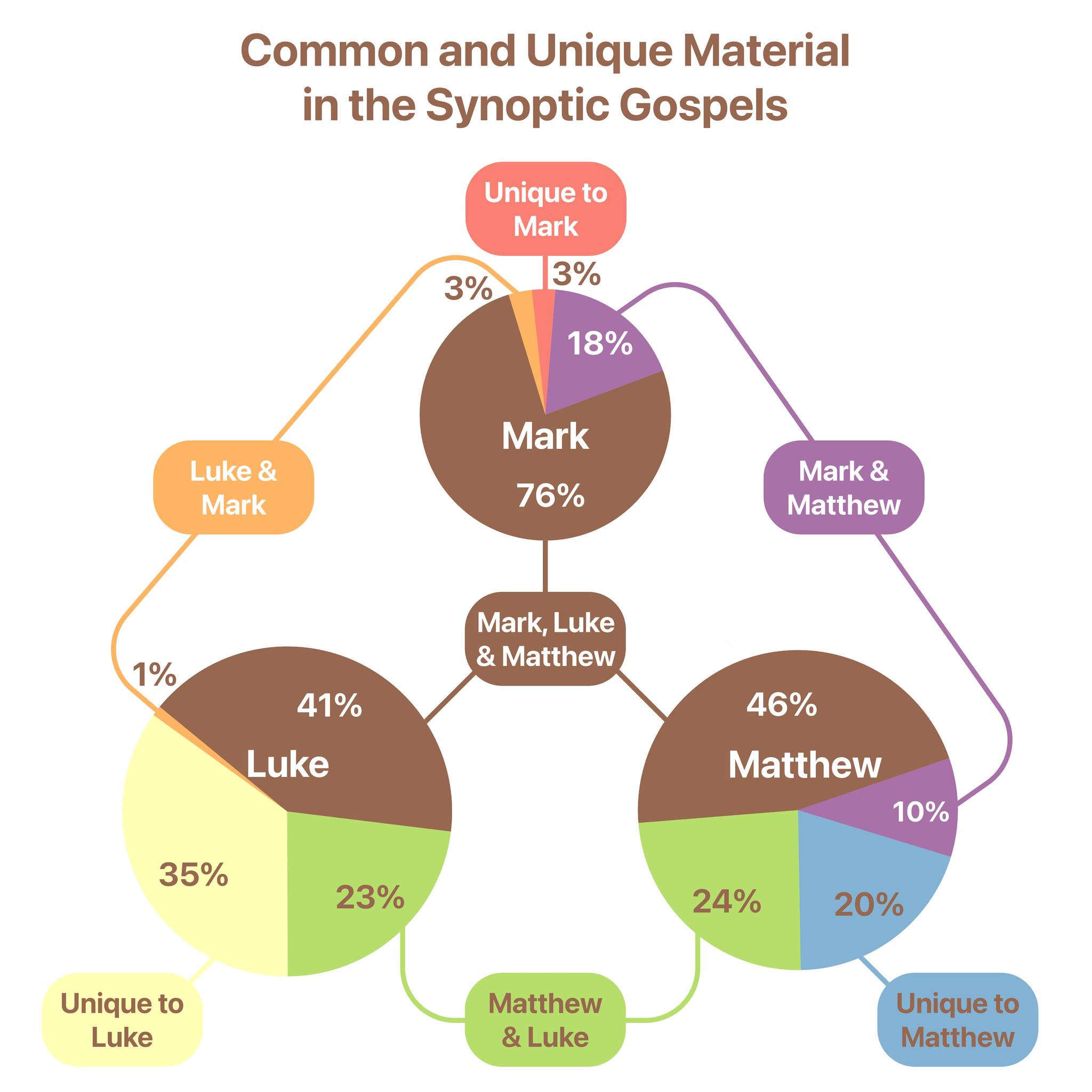

The coloring can be dramatic with shading background coloring, or more subtly as text color. When only using text color on yellow text with a white background, you need to pick a yellow color with a brightness close to 50% (which will look like a very light brown). But   bright yellow looks great for text on slides with a dark background  . The point is, you can adjust the shade of your colors depending on the context, which leads to the second point.

2. DO👏NOT👏ADD👏FORMATTING👏DIRECTLY👏TO👏YOUR👏TEXT. Use character styles in your word processor. This applies to all writing, really. Your published works will look better and make it through copy-editing better if you use style formatting, rather than direct formatting. If you do not know much about the subject of using styles, find a tutorial learn more. While you can apply a style to a paragraph, something more folks are familiar with (headings, block quotes, etc.), you can also create styles that are character styles, which only add formatting to a selected text. When you apply direct formatting, if you decide to change the shade of a color, you can maybe get by with a savvy change-all but you most likely will be going through and directly applying the color all over again. My suggestion for a style sheet setup is seen in the Word document image above; create a character style for each agreement category (Mark, Matt, Luke, Mark+Matt, Mark+Luke, Matt+Luke, and Mark+Matt+Luke). You can then make each of those styles match your formatting scheme, and then apply those styles to selected text as you go. Upgrade your workflow by adding a custom keyboard shortcut to each of those seven styles.

But here's the beauty and genius of applying styles rather than direct formatting… you can with one step adjust your formatting for Mark+Matthew agreements, and once you make the change in the style, it applies the change EVERYWHERE the style has been applied. Want to adjust the shade of orange everywhere? Boom. Want to add underlining? Boom. Want to change from text coloring to text shading? Boom.

Once you've done the work, you don't have to redo the work. This is so helpful once you've accumulated a long bit of text, possibly across table columns. A side benefit in Word, you can even do things like do a search and restrict that search to a style. Let's say you have a few long pericopes you've applied synoptic character styles to… you can with a search have it highlight everywhere a style is used, or everywhere a particular string occurs but only in one source class.

Being smart about how you set up your work can make the tedious work of doing your formatting go further and serve you across multiple uses.

April 01, 2023

Daily Posts From Now On

 I have so much free time these days, I have an 8-point plan to make a blog post every day. This will allow me to monetize it... I could use the cash.

March 11, 2023

Accordance Insert Verses using Shortcuts on macOS

The most current automation technology on macOS is Shortcuts. Here's an example of a Shortcut that 

  1. either grabs a selected verse reference or 
  2. queries you to provide on, and then 
  3. grabs that text from Accordance, using the text module specified in the Shortcut. 
  4. It then inserts that resulting text or copies it to the clipboard if that is not possible.
It can be downloaded here. Insert Accordance Text


You change the text module by launching Shortcuts, and editing the module short name in the text block to whatever you like.

April 01, 2021

macOS and Accordance running on Apple Watch


I wouldn't have thought it possible, but tweaking the kernel from the package at mini vMac I have now been able to install macOS on my Apple Watch. It is smooth as butter, even scrolling the window panes. The caveats are:

  1. I need my 3.0x reading glasses
  2. Processor tasks are sloooow. For instance, on Accordance, it takes 10 seconds for the simplest word search
  3. I haven't figured out how to select an object or text. But, connecting a Bluetooth trackpad solves that problem. Maybe just keep that in my back pocket?
  4. macOS 10.4.1 is the latest version that will run stable.

I'm still thinking through use cases, but it is thrilling to see nonetheless.

August 10, 2020

Accordance Better Touch Tool Preset

 For those who use Better Touch Tool to customize the Touch Bar on a MacBook Pro, I created a preset that contains a load of triggers for Accordance.

You can download the preset at the BTT community forum here.


The list of triggers include:

  • New tab… various
  • Copy as… various
  • Toggle Library
  • Toggle Instant Details
  • Change current field
  • Bookmark selection
  • Highlight selection
  • Global font size up / down
  • Previous / Next Hit
  • Context Increase / Decrease
  • Reader View Toggle
  • Display as Paragraph / Verses
  • Search selection on the web
  • Lookup selection in lexicon
  • New Workspace
  • Duplicate Current Tab
  • Get Verses… function
  • An AppleScript to simply paste the current selection in the open TextEdit window (this is simple to change to Word or Pages, etc.)

You will want to disable the ones you don't use. I'd suggest turning off the Control Strip to give more room for the Accordance-specific triggers.

July 26, 2020

Touch Bar Customizations for Accordance

Here is a quick video to show off how I've customized the Touch Bar on my MacBook Pro to work well with Accordance Bible Software. You may want to view it in YouTube for best results.


In general, I only find the Touch Bar useful in specific contexts. I'm now using BetterTouchTool to customize the Touch Bar. If there is interest in this setup for Accordance, I can see about sharing the preset.


April 01, 2020

New position

I am pleased to make public that I have accepted the positions of Campus Chaplain and Associate Professor of Religion at the University of Farmington.

May 23, 2019

Inconsistencies in Counting Overlapping Synoptic Stories

A side note to the previous posts on how best to graphically display overlap among the synoptic gospels. When we are using the pericope/section/story/number divisions as provided in the Aland Synopsis, I ran into places where I was having to make a judgment call in how I counted a section. What that means is, my resulting data was not above reproach. It would be simple if the gospel sections were all in the same order, and all discreet sections. Where an outline would be:

§ Matt Mark Luke
§1 Birth 1 - 1
§2 Baptism 2 1 2
§3 Healing A 3-4 2 3
§4 Healing B 5 3 -

But that's often not the situation. Because they occur in different order, sections in Aland are repeated, in particular, they are repeated each time that collection of verses occurs in the order for a given book. We even have a couple stories that occur in three different places in the triple tradition. Sometimes this is innocuous.
The Parable of the Great Supper that is in Matthew and Luke shows up twice in the synopsis and both times with the same verse reference:

§ Matt Mark Luke
§216 Great Supper 22.1-14 - 14.15-24
§279 Great Supper 22.1-14 - 14.15-24

The bold indicates that this is the place that it occurse in that books order. Luke's §216 occurs before the parables of salt and lost sheep. In Matthew, §279 is well after that, in a completely different act of the book. No problem. But one must use a consistent method so that the results are repeatable, because sometimes it's tricky.

My method for listing "which gospel sections overlap with sections of another gospel" has been:

  1. note the bolded sections in Mark, counting whether that section is also in Matt &/or Luke
  2. note the bolded sections in Luke that aren't also already bolded sections of Mark, counting whether that section is also in Matt or is stand alone, and
  3. note the bolded sections in Matthew not already accounted for that don't have corresponding material in Mark or Luke and count them.

A synoptics person might say, Mark sections, plus Luke's Matthew and Luke's sondergut, and Matthew's sondergut.
I also do it again switching Matthew's and Luke's place for comparison. And that's where I get most of my problematic results.
As one example, look at the The Women at the Tomb and Jesus Appearing to the Women.

§ Matt Mark Luke
§352 The Women At the Tomb 28.1-8 16.1-8 24.1-12
§353 Jesus Appears to the Women 28.9-10 - 24.10-11

When I'm trying to count how many pericopes/sections/stories/numbers overlap using the Aland divisions, I will get a different result depending on my method. In my first count, looking at bold Mark, then bold Luke, then bold Matthew, I will get one less Matthew and Luke count than when I prioritize Matthew's divisions before Luke's. This is because the same story is broken into two sections in Matthew, but remains as one primary section in Luke, according to Aland's method.
Of course I'm tempted to count them both no matter what, but methodologically, that's problematic since I'm not counting stories like the Great Supper twice.
This issue introduces subjectivity and bias into the procedure. I can't just make it up as I go along. This is one of the reasons that using Aland sections as a datapoint for this purpose falls short. Aland was set up to be descriptive of each book's order and divisions, and include it all. It was not set up to ensure 1 to 1 parity between content.

To further illustrate the flaws in what I'm doing, Goodacre (and Larsen) find 107 overlapping pericopae between Matt and Mark. My tables have 106 sections. They both have published books and I haven't, so I yield to their intelligence, but in looking over, I can't even see what I'm missing.
My sections are:
Matt and Mark only: 34, 130, 147, 148, 151, 152, 153, 162, 272, 275, 342
And Triple Tradition: 1, 13, 16, 18, 20, 30, 32, 37, 38, 40, 42, 43, 44, 45, 46, 47, 48, 49, 117, 118, 121, 122, 123, 124, 125, 128, 136, 137, 138, 139, 142, 143, 144, 146, 150, 154, 155, 158, 159, 160, 161, 163, 164, 166, 167, 168, 251, 252, 253, 254, 255, 262, 263, 264, 269, 271, 273, 276, 278, 280, 281, 282, 283, 284, 287, 288, 289, 290, 291, 292, 293, 294, 305, 306, 307, 308, 310, 311, 315, 330, 331, 332, 333, 334, 336, 339, 341, 343, 344, 345, 346, 347, 348, 350, 352

Unless they are counting the long ending? Still, the big issue is between Matthew and Luke, and my counts are different from theirs.

Having said that, when our purpose is inputing the data into broad-stroke Venn diagrams, a few differences in data points won't even perceivably alter the graphic.
Arbitrary decisions on how you decide to display the data make a much bigger impact. I hope to post on that in time.


May 22, 2019

Circles and Boxes and Comparing Gospels

Following on two previous posts looking at the efficacy of rectangular shapes in Venn diagrams for displaying synoptic overlap, I'd like to offer a bit more discussion of the options. For consistency, I'll continue to use the pericope divisions in the Aland Synopsis (as long as we all agree that we could and should do better).
I looked first at side by side two-corpus diagrams and then at a 3-way combination diagram. I'd like to reflect on the difference between the two, as well as one more look at circles and rectangles. The data I displayed in a rectangular diagram in that last post can also easily be displayed in a more typical circular Venn diagram:


Again, circle diagrams are fantastic for today's ASMR sensibilities.  But other than the aesthetic, I can't think of a single advantage of circular diagrams over rectangular Venn diagrams for two- and three-way comparisons. Look at the same data, displayed both ways, side by side. The Matthew blue circle and the Matthew blue square have the same area. Same goes for Luke and Mark, and each overlap section.
Both are able to display the data very well. To my eye, the circles are more pleasant to look at. However, the rectangles are more illustrative, in particular in ascertaining proportional relationships to the groups. In the circle diagram, I'm confused for instance in the area difference between the red uniquely Markan section and the orange Mark-Luke overlap. In the circle diagram, how do the slices for Mark-Matthew and Mark-Luke compare to each other. It's easy to see this in the rectangular diagram.
In the circle diagram, I have a hard time guessing the proportional relationships among the blue, green and yellow  (uniquely Matthew, Matthew-Luke, and uniquely Luke) sections. It is much more apparent in the rectangular diagram. For pedagogy and research, I would always choose the rectangular Venn diagram.

But is the three way comparison always the ideal? Is it everything you need? Maybe not.
Here is the data in three separate two-way Venn diagrams:
If you are not focusing on the triple tradition shared component, three discreet diagrams give information you can't see in the combined graphic. Of course, it gives you, for instance, the whole amount of Mark (red) not in Luke (yellow), without regard to whether it is in Matthew. In other words, these red sections are larger than in the combined three-way diagram.
Also nice is that this configuration allows you to line up each pair so that their relative lengths stand out better. The main point is that it is illustrative, even necessary to look at both styles. They each display information not available in the other.
It is easy to say, "Well, I just need the one, because the combined three-way diagram contains all the info that was contained in the three separate ones." But because you must make decisions on how to display the diagram (what edges align, which shape/proportion to make a given area), this is far from the case. I may, in one final blog post, explore the "prolegomena"—the assumptions/decisions—when making such a diagram.


May 20, 2019

Graphically Displaying Three Synoptic Gospel Data

Yesterday I offered why prefer to use rectangular shapes when displaying synoptic data in a Venn diagram. I have created several instances of these examples using verses, sentences and even words as data points. Using the Aland Synopsis Index as a quick and dirty (very dirty) easily accessible set of data, displaying each pair of synoptic gospels could look like this:


However, the superiority of rectangular shapes really shines when combining all three. I did not take the time to gather the specific numbers (yet maybe), but this is approximately what a resulting Venn diagram looks like compairing all three gospels.


Again, the proportions are very accessible upon examination. You can see that Unique Luke is what proportion larger than unique Matthew, and how it relates to what Luke shares with Mark, etc.
It is only when you add a fourth source that you need to create it as a polygon. And with that... the result is still a series of variously overlapping rectangles. Visually comparing rectangles is much more helpful for proportional comparison than common circles and ovals of Venn diagrams.

Note that there are still advantages for keeping the three separate pairs overlap comparison side by side, as three discreet diagrams.

Graphically Displaying Synoptic Data

A surprising thing popped up on my newsfeed today. (Yes, I still consume my RSS newsfeed daily. Call me a dinosar.) Mark Goodacre has reanimated his NTBlog for the purpose of reflecting on Matthew Larsen's book (which I have not seen). Mark @Goodacre has since microblogged (ie. Tweeted) on one particular feature in Larsen's book as a teaser for his next blog post, namely, the displaying of proportional synoptic data between two gospels. How much of Mark is in Matthew? How much of Matthew is in Luke? Etc. He has repurposed (colorized) Larsen's "proportional Venn diagram".


I do so enjoy such discussions, but seeing Larsen's graphic prompts me to revisit some work I have done for years but never completed on models for visualizing synoptic data.
I would like to publicly come out (momentarily reanimating my own blog in the process) in favor of rectangular Venn diagrams for comparing Gospel Synoptic Data. To explain:
Venn diagrams are most commonly thought of, and produced, as overlapping circles. This is because circles are gorgeous and tremendously satisfying.
However, a Venn diagram can be comprised of any shape (or variety of shapes). And given that the goal of comparing synoptic data is to, well, compare it, a rectangular application of Venn diagrams serves much better. Two primary reasons:

1. Visualizing proportionate size

Circles are fine for highlighting "relative" sizes, but not proportional ones. The areas of circles are very difficult to ascertain. To illustrate, look at these two diagrams:
In the first diagram, what proportion of the blue shape is overlapping with the red shape? What proportion is uniquely blue, or uniquely red?
One third. One third each. It's easy to tell. Immediately.
Now, what proportion of the blue circle is overlapping with the red circle?
Uh... er... Hmmm... "Honey, where are my calipers?"

2. Compare diagrams to each other

In the same way that rectangular shapes are easier to get a sense of their not just relative, but also proportionate size within a diagram, two or more diagrams beside each other can also be better evaluated in rectangular format.
To illustrate, let's look at the synoptic data that Mark Goodacre and Matthew Larsen are wrestling with. They are looking at how many "stories" or pericopes in one gospel are also in another. There will be stories unique to each, along with some overlap. This can be seen in the graphic tweeted above, where the unique blue Matthew passages and the unique red Mark stories overlap with purple. Likewise, yellow Luke pericopes and blue Matthew pericopes in another graphic would also share green overlap.
Ignoring for the moment how horrible it is to do this kind of comparison based on the pericope divisions in the Aland Synopsis (which doesn't inspire me to read Larsen), let's have a look at all three Venn diagrams (Mt-Mk, Mt-Lk, Mk-Lk) in the much more useful, boxier formats:


There are a lot of decisions that go into making such a diagram. I won't go into all those. But look how easy it is to compare the relative differences in each section. I don't think I need to say more about the graphics… they speak for themselves.

See here for a followup post on visualizing a comparison of all three gospels using a rectangular Venn diagram.

Couple notes:
I should say that my count of Aland pericopes shared among Mark and Luke was hasty and is bound to be off some, but I find that data point so useless, I didn't care to spend more time on it.

I've thought Mark Goodacre was brilliant for years, and consider myself his student though I've never been in his classroom, but I knew I was going to like Mark the first time I read his stuff many years ago and saw that he advocated the same primary-color-based system for marking a gospel synopsis that I had begun using in seminary (to Gene Boring's dismay). Though, I prefer to use 60% transparent white versions of the primary colors for true blending, because, you know, ugly.


April 01, 2019

Switching to Windows

Note: 
I've switched to Windows, so won't be posting here at all anymore.

October 20, 2018

Script to Return Every Version of a Verse Reference from Accordance

In a conversation on the forum, someone wondered how you might include a script to do a multi-version lookup. The idea is to take a verse reference and show a result that gives that text in every relevant version you have installed in Accordance.
Here is an example of how to do this.

multiModuleVerseLookup("John 2:1", true)

on multiModuleVerseLookup(theReference, quoteAsCitation)
-- set the delimiter between versions
set theDelimiter to return & "----------" & return
-- get moduleList
tell application "Accordance" to set moduleList to «event AccdVerL»
-- prepare textResult
set textResult to theReference & theDelimiter
repeat with thisModule in moduleList
-- lookup theReference in each module
tell application "Accordance" to set thisResult to «event AccdTxRf» {thisModule, theReference, quoteAsCitation}
-- add the result if the module contains theReference
if thisResult does not start with "ERR-" then set textResult to textResult & thisModule & return & thisResult & theDelimiter
end repeat
return textResult

end multiModuleVerseLookup


The results would look like:

"John 2:1
----------
GNT28-T
  Καὶ τῇ ἡμέρᾳ τῇ τρίτῃ γάμος ἐγένετο ἐν Κανὰ τῆς Γαλιλαίας, καὶ ἦν ἡ μήτηρ τοῦ Ἰησοῦ ἐκεῖ· — John 2:1
----------
CEB
  On the third day there was a wedding in Cana of Galilee. Jesus’ mother was there, and — John 2:1
----------
NRSVS
  On the third day there was a wedding in Cana of Galilee, and the mother of Jesus was there. — John 2:1

----------
…


It is self-explanatory for those who do any Applescripting. You could include it in an Automator workflow, etc.
Here is a simple complete script that when called from Quicksilver/Launchbar/a Workflow/etc. would bring up a dialogue box and then open the result in a TextEdit window.

-- use a display dialog to ask for valid verse reference
set dd to display dialog "Enter a valid verse reference:" default answer "John 1:1"
set theReference to text returned of dd
multiModuleVerseLookup(theReference, true)

on multiModuleVerseLookup(theReference, quoteAsCitation)
-- set the delimiter between versions
set theDelimiter to return & "----------" & return
-- get moduleList
tell application "Accordance" to set moduleList to «event AccdVerL»
-- prepare textResult
set textResult to theReference & theDelimiter
repeat with thisModule in moduleList
-- lookup theReference in each module
tell application "Accordance" to set thisResult to «event AccdTxRf» {thisModule, theReference, quoteAsCitation}
-- add the result if the module contains theReference
if thisResult does not start with "ERR-" then set textResult to textResult & thisModule & return & thisResult & theDelimiter
end repeat
-- display the result in a new TextEdit document
tell application "TextEdit"
activate
set textDoc to make new document at the front
set the text of textDoc to textResult
end tell
end multiModuleVerseLookup


September 27, 2018

Siri Shortcut Verse Lookup in Accordance

Here is a proof-of-concept video demonstrating that we're getting close to voice verse lookup. The problem right now is that you have to spell out the reference: “romans twelve colon three hyphen seven”.


With some work, a javascript shortcut could be made to take a normal string like “romans twelve three to seven” and format it properly into "Romans 12:3-7".

April 03, 2017

Adding Non-English Book Names to Acc-Insert Verses Service

Update: Version 12.0.5 has fixed this issue. The tutorial now stands as an example of how to do your own custom changes of any sort to an Inserted text.


The Accordance Services allow you to pull all kinds of text out of Accordance and into your current program, without ever leaving the program you're working in. You can see an overview here. It was pointed out on the forums that when using the "Acc-Insert Verses" Service to insert scripture text into your document, that the book names are always in English even if your default language is non-English.
Since the Accordance Services are a type of Automator Workflow, you can customize them to your hearts content. A simple solution, then, is to add a step in the workflow that substitutes all English book names, with the name of your choosing. Here is an example of how to do it.

You can download the Service here, and install it.

All I've done is add a "Run AppleScript" Action that dissects a tab-delimited list of
EnglishName[tab]nonEnglishName

EnglishName[tab]nonEnglishName
…
Hence, you can open up the Service in Automator and customize the list yourself, and save it.

For the Service to work, you need to make sure the "Get Text from Accordance" action has checked to "Use Citation Format", and that in Accordance:Preferences:Citation that you have not checked "Abbreviate book name".

That's all you really need to know to use the custom Service. For the curious, what I did was open the "Acc - Insert Verses" Service and duplicate it and named it with German in the title.

Then I added a new "Run Applescript" action and wrote a script that parses a tab-delimited list, making it easy to edit. The script looks for every instance of the original bookname followed by a space and a digit, replacing as directed. Here is the full text of the AppleScript:

on run {input}
set substitutionList to "Genesis Genesis
Exodus Exodus
Leviticus Levitikus
Numbers Numeri
Deuteronomy Deuteronomium
Joshua Josua
Judges Richter
Ruth Rut
1Samuel 1Samuel
2Samuel 2Samuel
1Kings 1Könige
2Kings 2Könige
1Chronicles 1Chronik
2Chronicles 2Chronik
Ezra Esra
Nehemiah Nehemia
Esther Ester
Job Hiob
Psalms Psalmen
Proverbs Sprichwörter
Ecclesiastes Kohelet
Song Hohelied
Isaiah Jesaja
Jeremiah Jeremia
Lamentations Klagelieder
Ezekiel Ezechiel
Daniel Daniel
Hosea Hosea
Joel Joël
Amos Amos
Obadiah Obadja
Jonah Jona
Micah Micha
Nahum Nahum
Habakkuk Habakuk
Zephaniah Zefanja
Haggai Haggai
Zechariah Sacharja
Malachi Maleachi
Tobit Tobit
Judith Judit
Wisdom Weisheit
Sirach Sirach
Baruch Baruch
1Maccabees 1Makkabäer
2Maccabees 2Makkabäer
1Esdras 1Esdras
Manasseh Manasseh
3Maccabees 3Makkabäer
2Esdras 2Esdras
4Maccabees 4Makkabäer
Matthew Matthäus
Mark Markus
Luke Lukas
Acts Apostelgeschichte
Romans Römer
1Corinthians 1Korinther
2Corinthians 2Korinther
Galatians Galater
Ephesians Epheser
Philippians Philipper
Colossians Kolosser
1Thessalonians 1Thessalonicher
2Thessalonians 2Thessalonicher
1Timothy 1Timotheus
2Timothy 2Timotheus
Titus Titus
Philemon Philemon
Hebrews Hebräer
James Jakobus
1Peter 1Petrus
2Peter 2Petrus
1John 1Johannes
2John 2Johannes
3John 3Johannes
John Johannes
Jude Judas
Revelation Offenbarung"
set theString to input as string
-- Create a tmp sed command file
-- s/foo\( [0-9])/bar\1/g
set tabReplace to "\\( [0-9]\\)/"
set paragraphReplace to "\\1/g
s/"
-- parse the replace string into lists
set commandString to ""
set otid to AppleScript's text item delimiters
set AppleScript's text item delimiters to tab
set commandString to text items of substitutionList
set AppleScript's text item delimiters to tabReplace
set commandString to "s/" & commandString as string
set AppleScript's text item delimiters to return
set commandString to text items of commandString
set AppleScript's text item delimiters to paragraphReplace
set commandString to (commandString as string) & "\\1/g"
set AppleScript's text item delimiters to otid
set commandFilePath to ((path to temporary items from user domain) as text) & "bibleBooks.sed"
try
set fileRef to open for access file commandFilePath with write permission
set eof of fileRef to 0
write commandString to fileRef
close access fileRef
on error
close access fileRef
end try
set posixPath to POSIX path of file commandFilePath
set scriptText to "echo " & quoted form of theString & " | sed -f " & quoted form of posixPath
set theResult to do shell script scriptText
return theResult
end run